
Making Games as a Solo Dev With AI Tools: What Actually Works
A solo developer's honest take on using AI tools for game development, what helps, what doesn't, and what the workflow actually looks like in practice.
There's a version of this article that breathlessly tells you AI has revolutionized game development and anyone can make a game in a weekend now. This isn't that article. We're a small studio that has shipped actual games using AI tools throughout the process, and the reality is more nuanced than the hype suggests.
AI tools genuinely help solo developers punch above their weight. They also introduce failure modes that didn't exist before, require their own skill set to use well, and are not a substitute for knowing what you're building and why. Here's what the workflow actually looks like when you're using these tools to ship real games rather than demos.
What tools do solo devs use to make games with AI?
A practical solo dev AI stack pairs a code editor like Cursor (with Claude Opus) and a framework like Phaser 3 with generative tools for assets: Gemini for sprite art, Suno for music, ElevenLabs for sound effects, and Kling for video backgrounds. Claude in conversation mode handles planning and architecture separately from the code editor.
Our current setup for game development: Cursor as the code editor with Claude Opus doing the heavy lifting on architecture and logic, Phaser 3 as the game engine with React, TypeScript, and Vite handling the build pipeline. That's the development side.
For assets: Gemini generates sprite art, which goes through a Python/Pillow pipeline for sprite sheet processing. Suno creates background music tracks. ElevenLabs generates sound effects. Kling produces video backgrounds for menu screens and cutscenes.
For planning and debugging: Claude (in conversation, not in the editor) handles architecture discussions, system design, debugging complex logic, and writing documentation. The split between Claude-in-conversation and Cursor matters, more on that in a minute.
| Role | Tool | What It Does |
|---|---|---|
| Code Editor | Cursor (Claude Opus) | Architecture, logic, surgical code changes |
| Game Engine | Phaser 3 + React, TypeScript, Vite | Runtime framework and build pipeline |
| Sprite Art | Gemini + Python/Pillow pipeline | Generates and processes sprite sheets |
| Music | Suno | Creates background music tracks |
| Sound Effects | ElevenLabs | Generates in-game SFX |
| Video Backgrounds | Kling | Produces menu screen and cutscene videos |
| Planning & Design | Claude (conversation mode) | System design, debugging, documentation |
What does AI actually do well for solo game development?
AI excels at architecture discussions, surgical code changes, asset generation at indie quality, and tracing complex bugs across multiple systems. It saves the most time when you give it specific, bounded instructions rather than open-ended requests, and when you use it to plan before writing any code.
Architecture discussions. Describing a game system in plain language and getting back a thoughtful analysis of how to structure it, what edge cases to watch for, and where the complexity lives, this is where AI earns its keep. Before writing a line of code for our boss fight system, we talked through the state machine design, the phase transition logic, and the interaction with the existing spawn system. That conversation saved days of refactoring.
Surgical code changes. Give Cursor a specific, bounded instruction, "add a phase transition to the Stage 3 boss that triggers at 50% HP, switches from spiral to radial burst pattern, spawns 4 minions at cardinal positions", and it performs. The key word is specific. Vague instructions produce vague code. Surgical instructions produce surgical results.
Asset generation at indie quality. A solo developer cannot afford to hire a sprite artist, a composer, a sound designer, and a voice actor. AI tools fill all of those roles at a quality level that's appropriate for indie games. The art isn't going to win awards, but it's significantly better than programmer art, and it's consistent enough to build a cohesive visual identity. Our Gemini-generated sprites have a painterly quality that works for the games we're making.
Debugging. Describing a bug in plain language, "enemies stop spawning after the boss dies on stage 4 but only if the player used the flamethrower during the boss fight", and having the AI trace through the code to identify the issue is genuinely faster than stepping through a debugger for certain classes of bugs. Especially the ones that involve state interactions across multiple systems.
What does AI do badly in game development?
AI struggles with large-scale code generation, maintaining context across big codebases, knowing when to stop iterating, and actual game design. It introduces subtle bugs (off-by-one errors, race conditions, incorrect collision layers) that only surface under real gameplay conditions, and it cannot judge whether your game is fun.
Large-scale code generation. Asking AI to "build the enemy system" produces something that looks right, compiles, and then breaks in subtle ways once real gameplay stress-tests it. The kinds of bugs that AI introduces in large code blocks are the worst kind, they're not syntax errors or obvious logic failures. They're off-by-one errors in spawn timing, incorrect collision layer assignments, race conditions in animation state machines. Things that only manifest under specific gameplay conditions that the AI never thought to test.
Maintaining context across a large codebase. Our main game files grew beyond what fits comfortably in a context window. At that point, AI tools start losing track of how systems interact, and changes to one file introduce regressions in another. The solution was splitting monolithic files (GameScene.ts, EnemySystem.ts) into smaller, focused modules (ObstacleSystem.ts, ParticleOverlaySystem.ts, StageSystem.ts). Smaller files mean the AI can hold the complete picture of what it's editing.
Knowing when to stop. This is the big one. AI tools will happily keep adding complexity, keep suggesting features, keep refactoring working code into something "better." The developer's job is to know when the code is good enough to ship and to stop touching it. A failed fix after one attempt should be reverted fully, strip back to the known good state and try one clean surgical fix. Never let the AI keep iterating on a broken approach.
Game design. AI can implement your design. It cannot tell you whether your design is fun. It can suggest mechanics that exist in other games, but it has no intuition for feel, pacing, juice, or the ineffable quality that makes a game satisfying to play. That part is still entirely on you.
What workflow works for making indie games with AI?
The best workflow is: plan the system in conversation first, then give the AI one surgical instruction at a time, test after each change, revert fully on failure, and gate every step before moving to the next system. Build outside-in (scaffolding first, then functions), and always check for orphaned imports after any refactor.
The pattern we've settled on after shipping multiple games:
Plan in conversation first. Talk through the system design with Claude in a chat window. Trace the logic, identify the edge cases, figure out the architecture. Don't write code yet.
Then give Cursor a surgical instruction. Not "build this system" but a specific, bounded change that you can verify immediately. One instruction, one deploy, one test. If it works, move on. If it doesn't work after one fix attempt, revert fully and try a different approach.
After any refactor, search for orphaned imports and references. AI tools are notorious for renaming something in one file and leaving stale references in three others. This is a manual check every time.
Build outside-in. Get the scaffolding working first, the game loads, the scene transitions work, the UI appears in the right places. Then fill in the functions. Iterate once the shell exists. Trying to build a complete system in one pass with AI is how you end up with a beautiful architecture that doesn't actually run.
Gate between every step in a multi-system build. After adding enemies, verify they spawn and collide correctly before adding the weapon system. After adding weapons, verify they fire and deal damage before adding the upgrade system. Never move forward on a broken foundation.
What we make at Choost
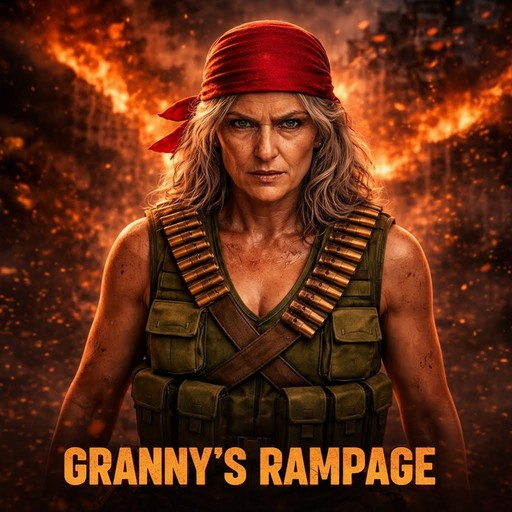
Choost is a small indie studio shipping AI-assisted games across multiple genres. Our current lineup includes Granny's Rampage, a bullet heaven where grandma fights through hell with a minigun, and Granny's Gambit, a Victorian deckbuilder roguelike. Both are available on itch.io, with Rampage also on Steam and Google Play.
We're a small indie studio. Our games: Granny's Rampage, a bullet heaven where grandma grabs a minigun and fights through hell, and Granny's Gambit, a Victorian deckbuilder roguelike starring a card-slinging nan with a chip on her shoulder. Granny's Rampage is $2.99 on itch (Windows) and free on Google Play (Android), and on Steam since June 22 (also $2.99). Granny's Gambit is pay-what-you-want on itch.
Is AI good enough for solo indie game development?
AI tools compress the indie game development timeline from years with a team to months solo. That's real. But they don't replace creative vision, design sensibility, or knowing when a game is done. The developer who understands what they're building and uses AI to execute faster ships something worth playing. The tools are good, and getting better, but they are tools, not replacements.
AI tools have compressed the timeline for shipping an indie game from "years with a team" to "months solo." That's real and meaningful. Games like Granny's Rampage, five stages, boss fights, multiple weapon systems, custom music and art, would not have been possible for a single developer on this timeline without AI assistance.
But the tools don't make game development easy. They make it possible with fewer people. The creative vision, the design sensibility, the ability to decide when something is done, that's still human work. The person who knows nothing about game development and tries to prompt their way to a shipped title is going to produce something that feels like it was made by nobody. The person who understands what they're building and uses AI to execute faster is going to produce something worth playing.
The bullet heaven genre is full of games made exactly this way, small teams or solo developers using AI tools to fill the roles they can't hire for, shipping games with personality and polish that would've been impossible five years ago. The tools are good. They're getting better. But they're tools, not replacements.
Frequently Asked Questions
What AI tools do solo game devs actually use?
A common solo dev stack includes Cursor with Claude Opus for code, Phaser 3 (or similar) as the engine, Gemini for sprite art, Suno for music, ElevenLabs for sound effects, and Kling for video backgrounds. Claude in conversation mode handles planning, architecture, and debugging separately from the code editor.
Can one person make a full game using AI?
Yes. AI tools compress the solo dev timeline from years to months by filling roles like sprite artist, composer, and sound designer. However, the developer still needs creative vision, design sense, and the discipline to know when a game is done. AI executes faster, but it cannot replace the human decisions that make a game fun.
What is the best workflow for making games with AI?
Plan the system design in conversation first, then give one surgical, bounded instruction at a time. Test after each change. If a fix fails on the first attempt, revert fully and try a different approach. Build outside-in (scaffolding first, then functions) and gate every step before moving to the next system.
What does AI do badly when making indie games?
AI struggles with large-scale code generation (introducing subtle bugs like race conditions and off-by-one errors), maintaining context across big codebases, knowing when to stop adding complexity, and actual game design. It can implement mechanics but has no intuition for whether a game feels fun to play.